In short: how to reduce customer service response times To reduce customer service response times, start by measuring first response time (FRT). Then use a combination of service software, autoresponders, SLA alerts, reply templates, and smart triage to remove delays before they reach the customer.
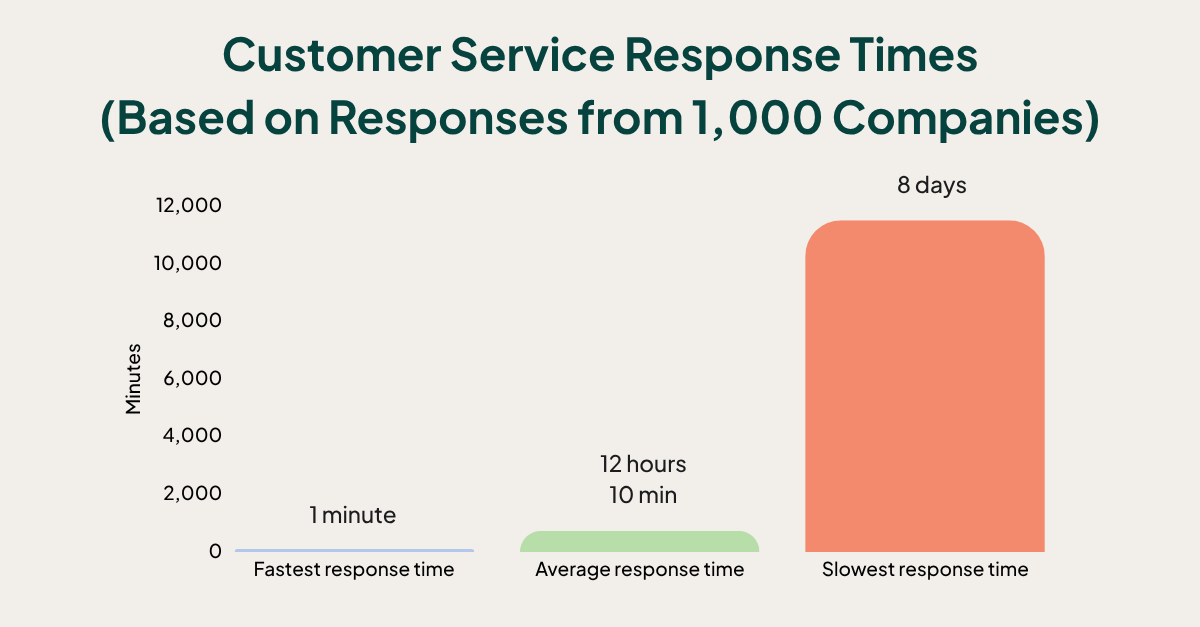
62% of businesses never respond to customer emails at all. Of those that do, the average response time is over 12 hours, and some take more than 8 days. Meanwhile, nearly half of customers expect a reply within 4 hours.
Every customer interaction is a chance to build trust or lose it. Fast replies feel respectful. Slow replies feel like being ignored. This gap is more than frustrating, it's expensive. But when you respond faster (and consistently), you protect loyalty, reduce churn, and make your service stand out.
If you want to reduce customer service response times, focus on one metric first: first response time (FRT).
In this article, you’ll learn:
- What first response time (FRT) means (and how to calculate it)
- Why speed matters for customer experience and revenue
- 7 proven ways to reduce response times without sacrificing quality
What is first response time (FRT)?
First response time (FRT) is the average time it takes your team to send the first reply after a customer contacts you (email, form, chat, etc.). It's a practical signal of how responsive your service is, how confident customers feel that their issue is being handled, and how customer-centric your business really is.
What is FRT and why does it matter? First response time (FRT) measures how long it takes you to send a first reply after a customer reaches out. It matters because customers judge your reliability before you even solve the problem. A fast first response reduces frustration, prevents repeat follow-ups, and improves satisfaction, even if the full resolution takes longer.
That’s why FRT is one of the simplest, most effective ways to improve customer experience, the #1 growth strategy of 2026.
How to calculate first response time
You only need two numbers:
- Total time to first reply (sum of time taken to send first responses in a period)
- Total number of first responses sent in the same period
FRT = total time to first reply ÷ number of first responses
Example: if you sent 3 first replies after 2, 4, and 6 hours, that’s 12 hours total. 12 ÷ 3 = 4-hour average FRT.
Note: For SuperOffice customers, FRT is tracked automatically by user, team, channel, and time period, no spreadsheet work needed.
Why fast customer service response times matter
You might think, “What’s a few hours?” But in customer support, the first reply sets the tone for the entire relationship.
Faster responses make customers feel valued
🥇 According to the CMO Council, fast response time is the #1 most important attribute of a good customer experience, ranked above helpfulness and empathy.
The faster you reply, the more important your customer feels. When someone gets a quick response, they assume your team is organised, present, and accountable.
If you miss the moment, you miss the customer
When companies don't respond quickly enough, customers often turn to competitors, vent publicly, or stop buying quietly.
- 70% of consumers say they’ll discourage others from buying after a negative service experience.
- 27% say slow, ineffective support is their biggest frustration with customer service.
Slow replies create more work (not less)
Delays cause repeat contact. Customers follow up again, often on another channel, creating duplicate tickets, more context-switching, and higher workload per issue. 40% of millennials wait just 60 minutes before reaching out on a second channel. Slow replies create a ripple effect.
Speed supports growth, not just service
A Harvard Business Review study of 500,000+ interactions found that faster replies increase the chances of conversion and repeat purchases. Respond faster, earn more.
7 proven ways to reduce first response time (without losing quality)
1. Use customer service software (not a shared inbox)
Still managing support from a shared inbox? Modern customer service software gives your team structure, speed, and visibility. It centralises every customer conversation, whether it started via email, web form, or chat, and gives agents the context they need to respond faster and smarter.
Companies using dedicated customer service software resolve tickets up to 35% faster and report higher customer satisfaction scores.
With SuperOffice Service, you can automatically assign tickets, view full customer history, track FRT, and set SLA escalation rules so nothing goes unanswered.
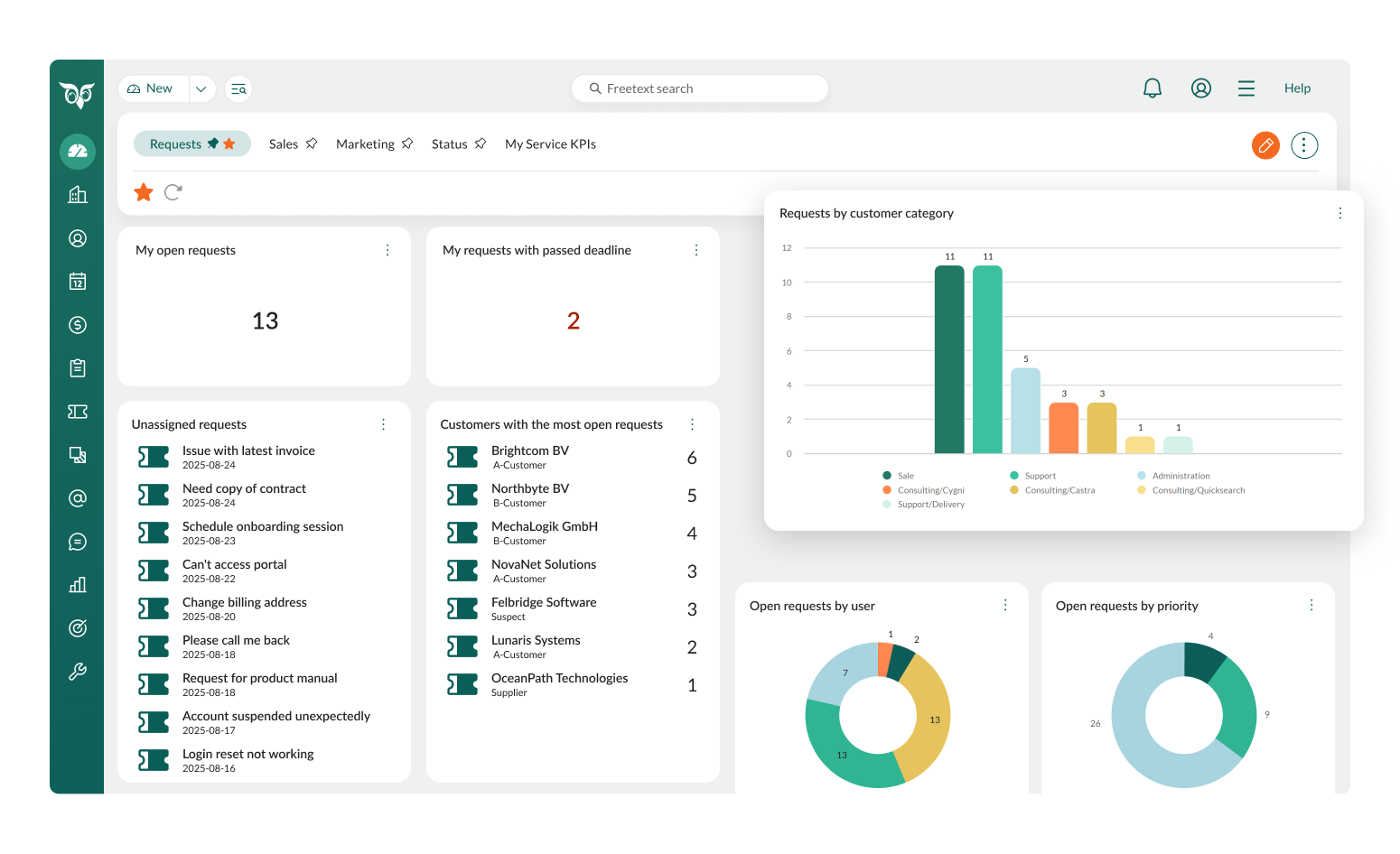
Using SuperOffice Service, our own customer support team reduced their average FRT from 5 hours to under 1 hour and have kept it there for 5 years straight.
Result: Our own support team reduced average FRT from 5 hours to under 1 hour and maintained it for 5 years straight.
2. Add an autoresponder that sets clear expectations
The silence after a customer hits "send" can feel like being ignored. An instant autoresponder fixes this, it doesn't solve the issue, but it reassures the customer their message was received and someone is on it.
Only 10% of companies use autoresponders, despite how easy and impactful they are. A good autoresponder includes:
- A friendly acknowledgement (“Thanks for reaching out!”)
- Expected response time (“We’ll get back to you within 2 hours.”)
- Business hours or SLAs (so customers know when you’re available)
- Helpful resources (FAQ/help centre)
- Proactive updates when there's a known issue (so customers don't need to chase you)
Pro tip: In SuperOffice CRM, autoresponders are part of the workflow and can be customised by category or channel (e.g., support vs billing), so replies feel tailored at scale.
Setting clear expectations reduces follow-up emails like “just checking if you got this” and buys your team time to respond with quality.
3. Set time-based alerts so nothing sits unanswered
Even strong teams miss emails when volume spikes. Time-based alerts notify your team when a ticket has gone unanswered beyond your SLA threshold: 30 minutes, 2 hours, or whatever you promise customers. These alerts notify your team when an email has gone unanswered for a set amount of time, like 30 minutes, 2 hours, or whatever your SLA promises.
Customers who don't get a fast response are 2x more likely to reach out on a second channel, doubling your workload instantly. Catching slow replies early protects both customer experience and team bandwidth.
4. Use templates and text shortcuts for faster (and consistent) replies
Not every support ticket is unique. Most teams see the same 15–20 questions repeatedly. Templates give agents a head start. Text shortcuts expand into full phrases with a few keystrokes (e.g. typing !FAQ inserts your full help centre link and greeting).
Templates are pre-written replies for common issues (password resets, billing questions, delivery timelines). They keep responses consistent, on-brand, and fast.
Companies using reply templates see up to a 40% reduction in average handle time per case.
Benefits beyond speed: fewer errors, better compliance in regulated industries, and faster onboarding for new agents.
Pro tip: SuperOffice CRM inserts dynamic fields (name, ticket number) so templates feel personal, not robotic.
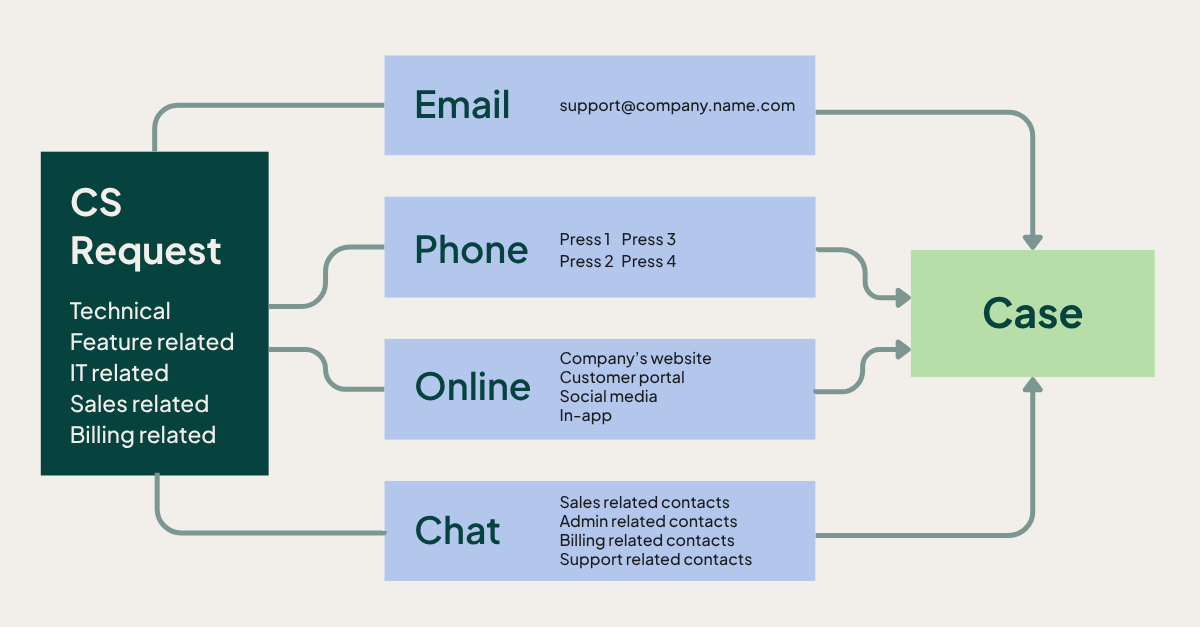
5. Categorise and prioritise requests (so urgent issues don’t wait)
Not all tickets are equal. Teams that move fast triage incoming messages, categorise by type (billing, technical, complaint), then prioritise by urgency and impact.
- "Demo request from enterprise lead" = high priority, route to Sales
- "General settings question" = standard priority, queue normally
Companies with automated ticket triage resolve issues 21% faster with highter customer satisfaction scores. Less context-switching, clearer team focus, urgent issues handled first.
6. Train your team to solve faster (not just reply faster)
Tools can't compensate for undertrained agents. Well-trained reps solve more tickets in less time, escalate less, and create fewer back-and-forth loops.
Focus areas:
- product knowledge (fewer “I’ll check and get back to you”)
- process familiarity (workflows, escalation paths, documentation)
- communication skills (clear, empathetic, professional under pressure)
Companies with ongoing training see an average 11% reduction in FRT and higher agent confidence.
Pro tip: Use FRT reporting to spot patterns. A consistently slower agent likely has a training gap, not a motivation problem.
7. Streamline your support process to remove hidden delays
Even high-performing teams slow down due to clunky workflows. Agents switching tools or searching old threads adds invisible minutes to every reply.
- Agents can spend up to 30% of their day switching tools
- Disconnected systems increase time-to-resolution by 26%
How to streamline your support process:
- Centralise communications in one workspace so your team can reply with full context, faster.
- Automate repetitive tasks (auto-tagging, routing rules, canned responses)
- Integrate CRM, billing, and help centre to reduce context switching
- Define escalation paths to stop tickets bouncing around
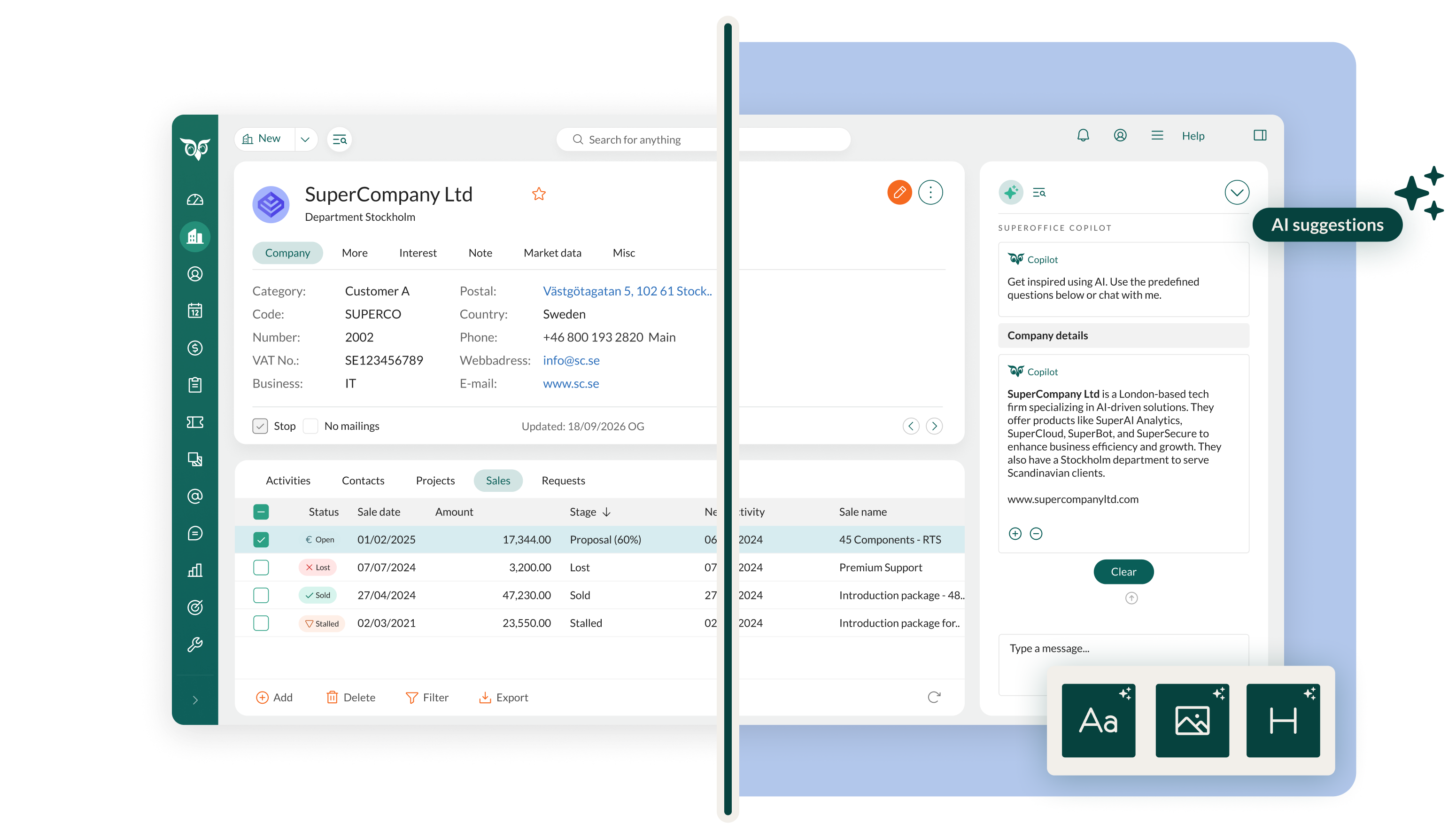
- Use AI to summarise threads, suggest replies, and flag urgent requests – so agents can respond faster with less effort.
Pro tip: Start with one process (like ticket routing). Map every step. Identify what’s manual and slow. Streamlining one workflow can reduce response time by 20% or more.
With SuperOffice Service, you can connect customer data, past interactions, workflows, and internal notes into one clean, user-friendly interface, so agents respond faster with full context. Book a demo with a CRM expert today.
Quick checklist: how to reduce response times this week
If you want impact without a big project, start here:
Wrap-up: Respond faster. Serve smarter
Reducing response times isn't about rushing, it's about being consistent, helpful, and customer-centric at every touchpoint. When customers know they'll hear from you promptly, trust rises. Loyalty follows. So does revenue.
- Customers expect responses in under 4 hours — most companies take 12+
- Speed influences loyalty and spend
- Reducing wait time reduces repeat contacts, confusion, and churn
Ready to cut response times without adding chaos? Explore SuperOffice Service to track FRT, route tickets by priority, and keep every conversation in one place.
Ready to cut response times without adding chaos?
Explore SuperOffice Service to track FRT, route tickets by priority, and keep every conversation in one place.
FAQ: customer service response times
A good first response time depends on channel and expectations, but many teams aim for a reply within a few hours for email support. Consistency matters most. A reliable response window builds trust more effectively than occasional fast replies.
Reduce avoidable work first: templates, snippets, triage rules, autoresponders, and SLA alerts. A service platform also prevents duplicate handling and helps any agent reply with full context.
Yes. Autoresponders reduce uncertainty by confirming the message was received and setting expectations. They don’t replace support, but they prevent frustration while the customer waits.
Because silence feels risky. If customers don’t get a response quickly, they try chat, phone, or social to get certainty. That creates duplicate work and slows your team down further.
Implement changes that reduce queue noise immediately: add an autoresponder, set time-based alerts, and publish templates for common questions. These steps often create measurable improvements without rebuilding your entire support process.